September 15, 2026 by Slint Developers

DRAFT: Slint 1.18 Released Blog RSS


We're happy to announce Slint 1.18. This release brings a flexbox layout, animations along a path, smaller and faster WebAssembly builds, and screen reader support for text input.

Slint is a toolkit written in Rust, with APIs for Rust, C++, JavaScript, and Python, for building native user interfaces for desktop, embedded, and mobile applications.

FlexboxLayout

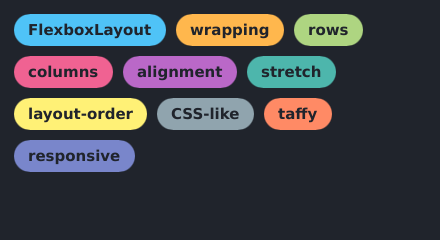
Flexbox support is one of our oldest feature requests, filed as #66 back in September 2020. The new FlexboxLayout element arranges its children in rows or columns and wraps them to the next line when they don't fit, following the CSS flexbox model:

export component Tags inherits Window {
    FlexboxLayout {
        spacing: 10px;
        padding: 14px;
        cross-axis-line-alignment: start;

        for tag in [
            "FlexboxLayout", "wrapping", "rows", "columns", "alignment",
            "stretch", "layout-order", "CSS-like", "taffy", "responsive",
        ]: Rectangle {
            border-radius: self.height / 2;
            width: label.preferred-width + 28px;
            height: label.preferred-height + 14px;
            label := Text { text: tag; }
        }
    }
}

Tags wrapping over multiple lines in a FlexboxLayout

The layout algorithm is implemented by taffy, the same engine used by Dioxus and Bevy, so the behavior matches what you know from the web. FlexboxLayout was contributed by David Faure from KDAB. Thank you, David!

If you come from CSS, most concepts carry over directly, but some properties have different names to stay consistent with the existing Slint layouts. The FlexboxLayout documentation maps each CSS property to its Slint counterpart.

One of the new properties works beyond the new element: cross-axis-self-alignment also applies to the children of a plain HorizontalLayout or VerticalLayout, letting a single child override the container's cross-axis-alignment there too.

Animating Along a Path


The Path element gained two functions: point-at(t) returns the point at a fraction t along the path, and angle-at(t) returns the tangent angle at that fraction. Together they make it easy to move an element along a curve, with the right orientation:

track := Path {
    commands: "M 40 220 C 120 40 200 40 240 140 C 280 240 360 240 440 60";
    stroke: #4a5160;
    stroke-width: 3px;
}

Image {
    source: @image-url("arrow.svg");
    property <float> progress: animation-tick() / 3s;
    x: track.point-at(progress).x - self.width / 2;
    y: track.point-at(progress).y - self.height / 2;
    transform-rotation: track.angle-at(progress);
}

An arrow following a curved path, rotating to match the direction of travel

Values of t outside of 0 and 1 wrap around, so animating t from 0 to N runs N laps around the path. Thanks to Robin Cramer for contributing this feature.

Slint on the Web Got Leaner and Faster

Slint applications compiled to WebAssembly now let the browser decode images instead of bundling the Rust image decoders into the binary. This cuts what the browser has to download: the printer demo compiled to WebAssembly now transfers 4.5 MB of compressed wasm, down from 5.3 MB with Slint 1.17. As a bonus, every image format the browser can display now works in Slint on the web, not just the formats we bundled. The one exception is compressed .svgz, which browsers don't decompress and is no longer supported on the web.

Rendering got an upgrade too: the FemtoVG renderer now runs on WGPU 30 and works on WebAssembly, using WebGPU where available and falling back to WebGL. On native platforms, the new unstable-wgpu-30 Cargo feature exposes the matching APIs to integrate your own WGPU 30 rendering with Slint.

Text Input Works with Screen Readers

Text inputs are now exposed to assistive technologies. A screen reader can read the content of a TextInput, LineEdit, or TextEdit, announce the character or word the caret moves over, report the current selection as it changes, and even set the selection itself, so "select all" spoken to the screen reader acts on the field. Password fields stay masked in what gets exposed.

We also cleaned up the accessibility tree: the internal elements that compound widgets are built from are now hidden, so a screen reader sees one button where there is one button, not its constituent rectangles.

This work was contributed by Arnold Loubriat, who also works on the AccessKit library that Slint's accessibility support builds on. Thank you, Arnold!

Less Ceremony in the Language

Several small language additions remove boilerplate.

Enum and color values are now inferred from the expected type of the expression (#897). Bare literals work in struct fields, array elements, function arguments, comparisons, and return statements:

struct Badge { text: string, background: color, alignment: TextHorizontalAlignment }

// Before:
property <Badge> badge: { text: "New", background: Colors.orange, alignment: TextHorizontalAlignment.center };
// Now:
property <Badge> badge: { text: "New", background: orange, alignment: center };

Struct fields can declare a default value, so partial initialization fills in the rest:

struct Player {
    name: string = "unknown",
    lives: int = 3,
}
property <Player> player: { name: "Olivier" };  // player.lives == 3

Arrays and models gained push, remove, insert, and index-of, with matching Model API additions in every language binding:

property <[string]> tags: ["desktop", "embedded"];
clicked => {
    if tags.index-of("mobile") == -1 {
        tags.push("mobile");
    }
}

And strings gained starts-with(), ends-with(), and replace-all().

Dynamic Z-Ordering


The z property is no longer restricted to compile-time constants: siblings with dynamic z values are re-sorted at runtime. Use it to raise the active card, tab, or draggable item above its siblings:

for card[i] in cards: Card {
    z: i == root.active ? cards.length : i;
}

This closes #221, open since May 2021.

Custom Window Chrome

Applications that draw their own window decorations with no-frame: true get two new building blocks.

The WindowMoveArea element turns a region of your UI, such as a custom title bar, into a handle for moving the window:

export component App inherits Window {
    no-frame: true;
    VerticalLayout {
        Rectangle {
            height: 32px;
            WindowMoveArea {
                HorizontalLayout {
                    Text { text: "My Application"; }
                    Button { text: "✕"; clicked => { root.close(); } }
                }
            }
        }
        // ... the rest of the UI
    }
}

The move only starts once the cursor drags past a small threshold, so plain clicks still reach child elements and buttons inside the title bar keep working. The windowing system performs the move; it is supported with winit on Windows, macOS, X11, and Wayland, and with Qt.

To complete the custom look, MouseCursor.custom() sets a mouse cursor from an image, with a hotspot:

TouchArea {
    mouse-cursor: MouseCursor.custom(@image-url("brush.png"), 2, 2);
}

Performance

Text layout results are now cached and shared between measuring, hit-testing, and drawing. Previously only drawing was cached, so a TextEdit holding a large document re-shaped the whole text on every click, cursor movement, and size query. Editing long documents is now much smoother.

The Rust code generated from .slint files got smaller and cheaper to compile. On the largest real-world project we benchmark with, 65,000 lines of .slint code, the generated Rust shrank by about 10% and cargo check got 16% faster compared to Slint 1.17. The generated C++ code shrank as well.

Notes for Upgrading

A few changes in this release affect existing code:

  • The viewport-x/viewport-y/viewport-width/viewport-height properties of Flickable are renamed to content-x/content-y/content-width/content-height. The old names keep working as deprecated aliases and produce a warning.
  • Binding loops that go through two-way bindings are now detected at compile time instead of panicking at runtime (#417). This is a win, but it can surface an error in code that previously compiled and appeared to work.
  • Writing to the current-value property of a ComboBox now selects the matching row in the model; writing a value that is not in the model clears the selection (#11970).
  • Window.close() now returns a bool that is true only when the application accepted the close request.
  • Setting the x and y properties of Window is deprecated; the position is controlled by the windowing system.

Other Changes

Additional items worth highlighting:

  • Files in drag and drop: a DataTransfer can now carry a list of file paths in addition to text and an image. With the Qt backend, drags can also be dropped onto other applications; the same for winit is in development upstream.
  • Node.js event loop on Windows: the Slint event loop is now integrated with the Node.js event loop on Windows, completing the work we shipped for Linux and macOS in 1.17.
  • Python fixes: Ctrl-C now interrupts a running event loop and raises KeyboardInterrupt, and the asyncio integration no longer leaks memory or burns CPU while a socket receives data.
  • Alpine Linux: we now publish musl binaries, so npm install slint-ui and pip install slint work on Alpine Linux.
  • Reproducible builds: the generated code and bundled translations are now deterministic.
  • Platform.is-app: a constant that is false when the file is shown in the live-preview or viewer, useful for supplying placeholder data during design.
  • Input method hints: the new input-method-hints property on TextInput and LineEdit tells the platform's input method about auto-capitalization, auto-correction, and auto-completion.
  • More text control: max-lines limits the number of rendered lines, and line-height-factor scales the font's natural line height.
  • Decode images from memory: Image::load_from_data() in Rust and C++ decodes an encoded image (PNG, JPEG, SVG, ...) from a memory buffer.
  • Smarter renaming: renaming a Slint property or callback through the language server now offers to also rename the corresponding accessors in your Rust or C++ code.

For the full picture, see the ChangeLog.

Getting Started with Slint 1.18

Don't forget to star us on GitHub, join our Mattermost chat, and share your projects.

Thanks

Big thanks to everyone who contributed code, fixes, or feedback. You help us make Slint better with every release.

@0x6e @ahayzen-kdab @amirHdev @badicsalex @DataTriny @dfaure-kdab @eira-fransham @farmaazon @flukejones @GrandAdmiralBee @greg-hellings @hronro @ImFeH2 @janekbt @janwiwi @lasernoises @latent-9 @marcothaller @MineHighVN @Montel @nichturner @npwoods @okhsunrog @R-Cramer4 @redstrate @renatofilho @showier-drastic @task-jp @the-argus @tilladam @uAtomicBoolean @yebei199


Comments

Slint is a Rust-based toolkit for creating reactive and fluent user interfaces across a range of targets, from embedded devices with limited resources to powerful mobile devices and desktop machines. Supporting Android, Windows, Mac, Linux, and bare-metal systems, Slint features an easy-to-learn domain-specific language (DSL) that compiles into native code, optimizing for the target device's capabilities. It facilitates collaboration between designers and developers on shared projects and supports business logic development in Rust, C++, JavaScript, or Python.